
Official Platform Download正式版软件下载
Windows
Desktop Client电脑客户端
Chinese Version 中文版
电脑版(中文)
Full-featured trading on Windows. Advanced charting, multi-window layout, real-time order execution.
完整桌面交易功能,进阶图表工具,支持多窗口布局,实时下单执行。
Download for Windows下载电脑版(中文)
Android
Android App安卓手机版
Chinese Version 中文版
安卓版(中文)
Optimised for Android. Fast execution, clean interface, full account management.
为安卓优化,快速执行,简洁操作界面,完整账户管理功能。
Download for Android下载安卓版(中文)
iOS / iPhone
iPhone App苹果手机版
Chinese Version 中文版
苹果版(中文)
Full-featured trading on iPhone. Real-time quotes, biometric login, instant notifications.
iPhone完整交易功能,实时报价,生物识别登录,即时推送通知。
Download for iPhone下载苹果版(中文)
Installation Guide安装教程
Important — Before Installing:安装前重要提示:
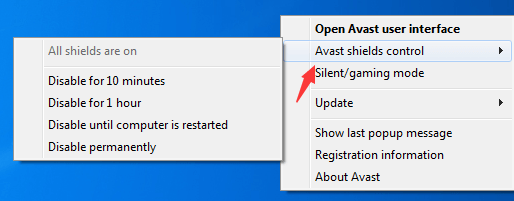
Please disable your antivirus software before downloading and installing. Re-enable it after installation is complete.
请在下载及安装前先关闭杀毒软件,安装完成后再重新开启。
1
Download the installer下载安装包
Click the "Download for Windows" button above. The file
信辉客户端安装包.exe will begin downloading.点击上方"下载电脑版"按钮,文件 信辉客户端安装包.exe 将开始下载。2
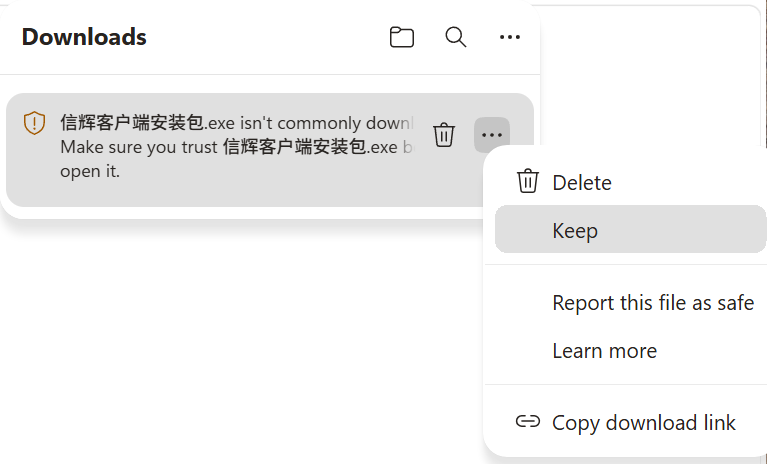
Browser SmartScreen warning — click the three dots (⋯)浏览器 SmartScreen 警告 — 点击三个点(⋯)
After downloading, your browser may show a warning: "信辉客户端安装包.exe isn't commonly downloaded." Do NOT click Delete. Click the three dots (⋯) on the right side of the download bar, then select "Keep".下载完成后,浏览器可能显示警告:"信辉客户端安装包.exe isn't commonly downloaded." 请不要点击 Delete。点击下载栏右侧的三个点(⋯),然后选择 "Keep"(保留)。
3
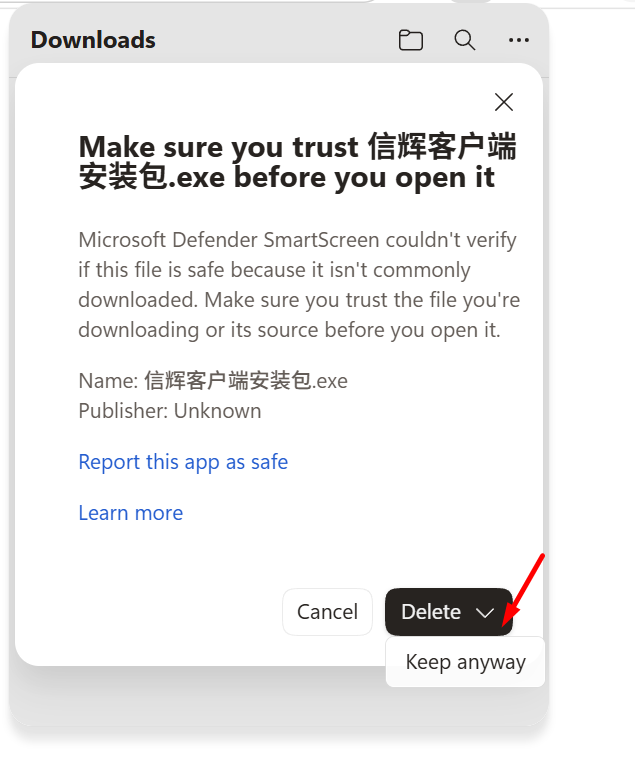
Windows Defender SmartScreen — click "Keep anyway"Windows Defender 二次确认 — 选择 "Keep anyway"
A second warning may appear: "Make sure you trust 信辉客户端安装包 before you open it". Click the arrow (▾) beside the Delete button, then choose "Keep anyway".可能会弹出第二个确认窗口:"Make sure you trust 信辉客户端安装包 before you open it"。点击 Delete 按钮旁边的箭头(▾),然后选择 "Keep anyway"(仍然保留)。
4
Run the installer and complete installation运行安装包完成安装
Temporary disable any antivus software before installation. Double-click the downloaded file to run the installer. Follow the on-screen instructions to complete installation. Re-enable your antivirus after installation.安装前请暂时关闭所有杀毒软件。 双击下载好的安装包运行安装程序,按照屏幕提示完成安装。安装完成后请重新开启杀毒软件。
5
Launch and login启动软件并登录
Open the Xinhui platform from your desktop shortcut. Enter your account credentials to log in.从桌面快捷方式打开信辉软件,输入账户信息登录。
Note for Android users:安卓用户注意事项:
You may need to allow installation from unknown sources. Some phone brands (especially Huawei/OPPO/Vivo) have built-in security software that may block the installer — see instructions below.
您可能需要允许安装来自未知来源的应用。部分手机品牌(尤其是华为/OPPO/vivo)的内置安全软件可能会阻止安装——请参阅下方说明。
1
Download the APK下载安卓安装包(APK)
Tap the "Download for Android" button above. The APK file will download to your phone.点击上方"下载安卓版"按钮,APK文件将下载到您的手机。
2
Allow "Install unknown apps" in settings在设置中允许"安装未知来源应用"
When prompted, go to Settings → Security (or Privacy) → enable "Install unknown apps" for your browser or file manager. On some devices this appears when you tap the APK file.当系统提示时,进入设置 → 安全(或隐私)→ 为您的浏览器或文件管理器开启"安装未知来源应用"。部分手机在点击APK文件时会直接弹出此提示。
3
Huawei phones — disable Phone Manager / Pure Mode华为手机 — 关闭手机管家 / 纯净模式
Huawei devices may show a warning from Phone Manager (手机管家) or block the install due to Pure Mode (纯净模式). Steps: Open Phone Manager → Virus Scanner, select "I know the risks, continue". Or disable Pure Mode in Settings → Security → Pure Mode.华为手机可能会弹出手机管家警告,或因纯净模式阻止安装。处理方法:打开手机管家 → 病毒扫描,选择"了解风险,继续安装"。或在设置 → 安全 → 纯净模式中关闭该功能。
4
OPPO / Vivo / Xiaomi — system security promptOPPO / vivo / 小米 — 系统安全提示
These brands may show a security alert. Tap "Continue" or "Install anyway" to proceed. Do not click "Delete" or "Cancel".这些品牌的手机可能会弹出安全提示,点击"继续安装"或"仍然安装"即可。请勿点击"删除"或"取消"。
5
Complete installation and login完成安装并登录
Tap "Install" to complete. Open the app, enter your account credentials to log in.点击"安装"完成安装。打开应用,输入账户信息登录。
The iOS version is distributed outside the App Store. You will need to trust the developer certificate in your iPhone settings after installation.
苹果版通过非App Store渠道分发,安装后需要在 iPhone 设置中信任开发者证书。
1
Open the download link in Safari在 Safari 中打开下载链接
Tap the "Download for iPhone" button. Use Safari browser — other browsers may not support direct app installation.点击"下载苹果版"按钮。请使用 Safari 浏览器,其他浏览器可能不支持直接安装。
2
Tap "Install" when prompted弹出提示时点击"安装"
A popup will ask if you want to install the app. Tap "Install" to confirm.页面会弹出询问是否安装应用的对话框,点击"安装"确认。
3
Trust the developer certificate信任开发者证书
After installation, go to Settings → General → VPN & Device Management. Find the app's developer name and tap "Trust", then confirm. You can now open the app normally.安装完成后,进入设置 → 通用 → VPN与设备管理,找到该应用的开发者名称,点击"信任"并确认。之后即可正常打开应用。
4
Login to your account登录您的账户
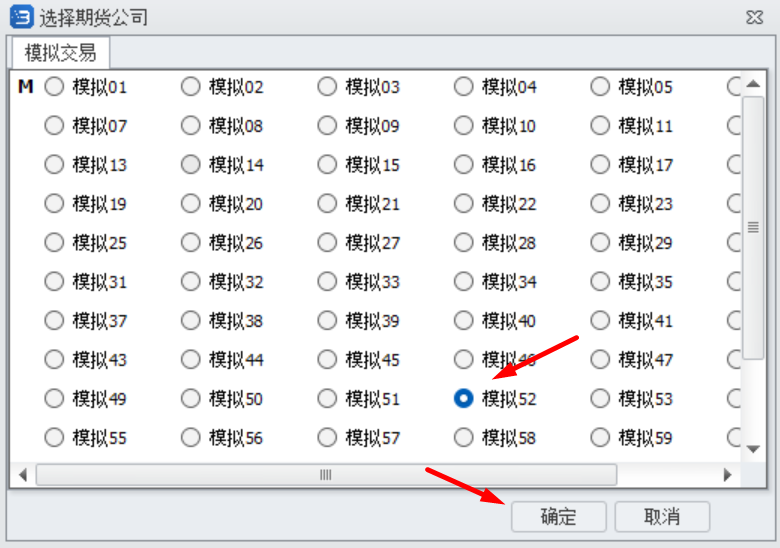
Open the Xinhui app and enter your account credentials. For demo account use Station No. 52.打开信辉应用,输入账户信息登录。模拟账号请使用站点号 52。
Demo Account模拟账号
Apply for a Demo Account
申请模拟交易账号
Practice futures trading risk-free with a demo account. Use real market data with virtual funds. Station No.: 52. 使用模拟账号进行零风险期货练习,真实行情数据 + 虚拟资金。模拟登录站点号:52。
Step 01
Open application link打开模拟号申请链接
Click the button below to open the demo account registration page in a new tab.
点击下方按钮,将在新标签页中打开模拟账号申请页面。
Register Now立即申请模拟账号
Register Now立即申请模拟账号
Step 02
Complete registration按提示完成注册
Follow the on-screen instructions to apply for your demo account.
根据网页提示,申请开户即可。
Step 03
Password requirements密码格式要求
Password must contain uppercase letters, lowercase letters and numbers. Minimum 8 characters.
密码格式为字母大小写包括数字,总长度不能低于8位。
Step 04
Save your account — Station No. 52牢记账号 — 模拟站点号 52
After registration, keep your account number safe. Log in using Station No.: 52 in the Demo platform.
注册成功请牢记账号。在模拟客户端中使用站点号:52登录模拟账户。
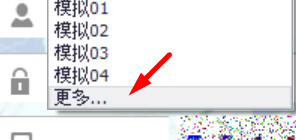
Demo Platform Downloads模拟版软件下载